


Lexus
4.74.75K Reviews
App Specs
- Version
- 3.5.0
- Updated On
- License
- Free
- Downloads
- 500,000+
- Developer
- Lexus Mobile Apps
- Categories
- Auto & Vehicles
- Platform
- Android, iOS
Screenshots
 Analysis by AppCompare
I judge a car companion app by what happens between noticing a need and getting something useful done. With Lexus, that can mean checking where I left the car, looking over a maintenance alert, or arranging a service visit without starting from scratch. The important caveat is fit: the app currently supports Lexus vehicles from 2010 onward, with a newer cutoff for Hawaii. I’d check that my vehicle and location qualify before building a daily routine around it.
Start with the car, not the app
My first practical question would be whether my Lexus is eligible and whether the features I care about apply to that vehicle. Connected-car tools can vary by model and equipment, so I wouldn’t assume that every function works identically across the entire supported range. If remote access is the main reason I’m downloading it, I’d confirm that capability for my own car rather than treating the app’s presence on my phone as proof that every remote action is available.
That distinction matters more than it sounds. A driver who mainly wants appointment reminders may get value from the app even if a particular connected function isn’t part of their setup. Someone expecting the phone to replace a key or provide every detail about the vehicle should set more modest expectations and keep the physical controls and owner information close at hand.
Move from a reminder to a useful next step
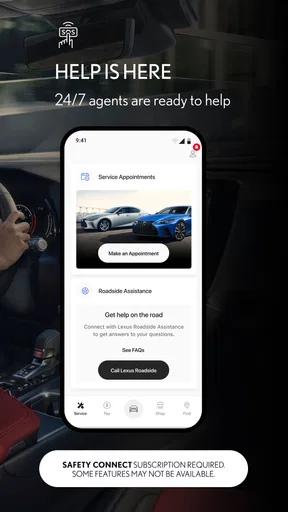
Once the app is connected to a supported vehicle, I’d use it as a starting point for small ownership tasks rather than another screen to check out of habit. A health notice is most useful when I can turn it into a decision: inspect the issue, plan a service visit, or ask the dealer a focused question. The app’s vehicle information and service tools can help me arrive at that conversation better prepared, but they don’t replace a technician’s inspection or my own attention to warning lights.
For example, if a reminder appears during a busy workday, I can note what it says and decide whether to contact my preferred dealer when I have a moment. That is a more realistic use than expecting an alert to diagnose a problem fully. I’d also check that notifications are enabled if I want reminders to reach me; otherwise, I may need to open the app deliberately to review what has changed.
Know where the handoff happens
The app can bring vehicle information and service planning together, but some parts of ownership still happen outside the phone. A scheduled appointment needs a real service visit, and a concern that affects safe driving deserves prompt attention rather than waiting for an app prompt. I see the app as a convenient bridge to the dealer, not a substitute for the dealer or for roadside help when that is what the situation calls for.
That handoff is also why I’d keep the vehicle’s basic details handy when contacting a service department. The app can help me stay organized, while a person at the dealership can clarify what work is appropriate and when it can be done. Drivers who prefer one place for every brand of car may find a manufacturer-specific setup less convenient than a general maintenance tracker, but the Lexus focus can make it a more natural fit for owners who already rely on a Lexus dealer.
Worth Reading Before You Choose

EA SPORTS FC Mobile 26 Is a Bigger Football Game, but It Takes Time

Flipboard Shows What News Apps Must Do Beyond the Feed

Switching to Android Auto Means Rethinking Your Driving Routine

Google Calendar Makes a Crowded Week Easier to Manage

Ludo King Makes the Most of the Minutes Between Plans

Baby Panda World Brings Quick Play to Modern Phones, but Its Game Library Feels Busy
Who will get the most from it?
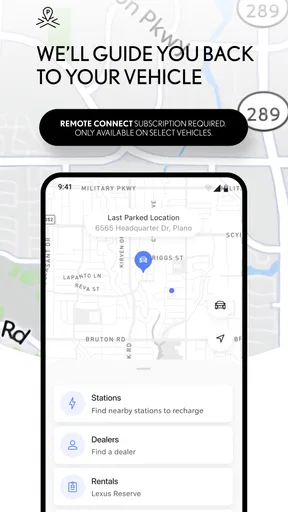
I’d recommend trying it if you own an eligible Lexus and want a central place for connected-car tasks, vehicle updates, or service planning. It makes the most sense for people who often forget where they parked, like checking in on vehicle condition, or would rather organize dealer visits from a phone than search through old messages. The app is free, carries an Everyone age rating, and comes from Lexus Mobile Apps; its 4.7 average from around 38,000 ratings suggests many users find it useful, though ratings can’t tell me whether it supports a particular car or workflow.
It is less compelling if you drive another make, have an unsupported vehicle, or only want turn-by-turn directions and music. In those cases, the navigation already built into a phone or car may be the simpler choice. The app has more than 500,000 installs, and its current version is 3.4.0, but neither fact changes the practical test: does it support the vehicle I actually drive, and do its available tools solve a recurring task for me?
If I were helping a friend decide, I’d suggest a simple trial: check eligibility, connect the car, then use one feature they genuinely need during the first week. If the goal is finding the vehicle after shopping, try that in a familiar parking area before relying on it in an unfamiliar one. If the goal is maintenance, review the vehicle information and see whether it helps prepare a useful question for the dealer. This keeps expectations grounded and reveals whether the app fits their habits.
The listing identifies the app as having been released on August 19, 2019, and its minimum operating-system requirement is version 10. I’d check both before installing, especially on an older phone. Those details are easy to overlook when the main focus is vehicle compatibility, yet a suitable car is only half the equation: the phone also needs to run the app comfortably.
If I were a new Lexus owner, I’d treat setup as an ownership handoff. I’d make sure I can access the account, identify the vehicle correctly, and understand which functions are available before depending on them. That small bit of preparation can prevent an awkward moment later, such as expecting a remote action to work when I’m already rushing out the door. For a shared household car, I’d also agree on who handles alerts and service planning so two drivers don’t assume the other person has dealt with a reminder.
The app is a focused companion rather than a universal car dashboard. That is its main trade-off: it can be more relevant than a generic tracker when the task involves an eligible Lexus, but it is not the best answer for someone managing several makes in one place. I’d keep a broader maintenance log if I owned multiple brands, and use this app for the Lexus-specific connection and dealer workflow. The two approaches can complement each other without forcing every vehicle into the same system.
There is also a useful difference between information and action. A vehicle update may tell me that something deserves attention, but I still need to judge urgency and arrange the next step. I wouldn’t use a reassuring-looking screen to dismiss a dashboard warning, nor would I assume every maintenance question can be settled remotely. Used thoughtfully, the app helps me notice and organize; the inspection and repair decisions still belong in the real world.
My bottom line is that Lexus is worth a look for owners whose vehicle and location fall within its support range and who will actually use its connected or ownership tools. I’d skip it if I only need generic maps, music, or reminders, or if my car is outside the supported range. For the right owner, the best result is not that the app replaces every part of car ownership; it is that a few everyday tasks become easier to find, remember, and hand off to the right person.
Connecting Your Drive
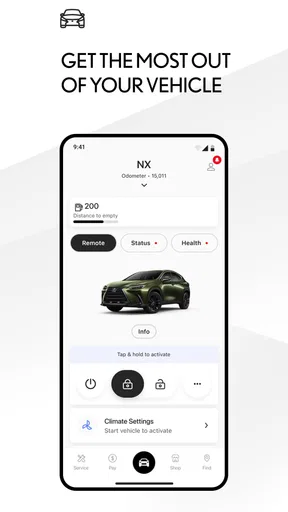
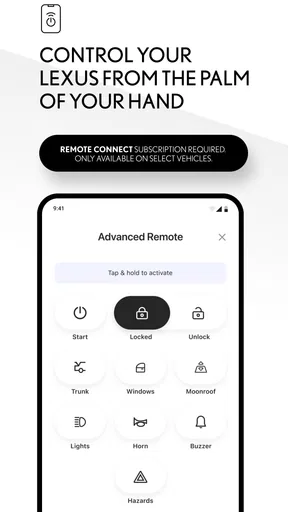
The first thing you’ll notice about the Lexus app is how effortlessly it connects you with your ride. Whether you’re trying to locate your car in a packed parking lot or need to start it remotely on a frosty morning, this app has got you covered. I was pretty impressed with the remote start feature. Imagine sipping your coffee while your car heats up or cools down just the way you like it. Sweet, right?
And oh, the vehicle finder feature is a lifesaver! No more wandering around like a lost puppy in huge parking areas. It’s like having a personal assistant that keeps track of your car for you. I find it incredibly handy, especially after a long day when all you want is to head home without any fuss.
Stay Updated with Vehicle Health Reports
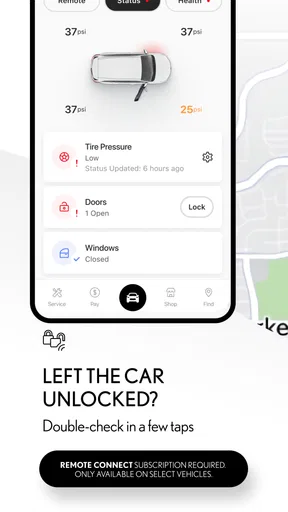
Keeping tabs on your car’s health has never been easier. The app sends you real-time alerts about your vehicle’s health. From engine issues to low tire pressure, you’ll get notified before things escalate. I’ve always been one to avoid last-minute surprises, and with these alerts, I feel more in control of my car’s maintenance schedule. It kind of feels like having a mini mechanic in your pocket.
The app also provides a detailed breakdown of your vehicle’s vitals. This means you can keep track of everything from fuel levels to battery health. It's an amazing way to ensure that your car is always in top-notch condition.
Personalized Driving Experience
What really makes this app stand out is the level of personalization it offers. You can set up your preferred dealer, schedule service appointments, and even get push notifications for recalls or service reminders. It’s like having a dedicated concierge for everything car-related.
Plus, the app keeps track of your driving habits, providing insights to help you drive more efficiently. It’s these little things that make a big difference when you’re trying to be more eco-friendly or just save some bucks on gas.
Entertainment and Navigation
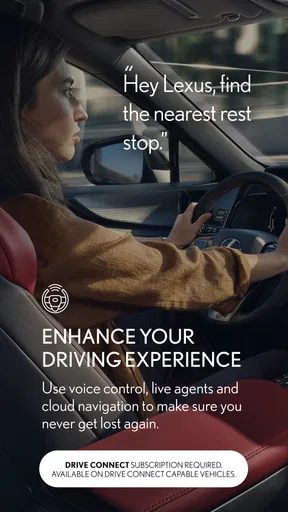
Now, let’s talk about entertainment and navigation, because who doesn’t love a good road trip with some killer tunes? The app integrates seamlessly with your car’s infotainment system, allowing you to control music and navigation effortlessly. It’s super convenient to have all your favorite playlists and destinations just a tap away.
And the navigation feature is pretty spot-on. Whether you’re looking for the nearest coffee shop or planning a route for your next adventure, it’s reliable and easy to use. I’ve found it particularly useful when exploring new areas or making sure I take the quickest route during rush hour.
Final Thoughts
Overall, the Lexus app is a must-have for any Lexus owner. It’s like having a personal assistant, mechanic, and entertainment system all rolled into one. The app is intuitive, user-friendly, and genuinely enhances your driving experience. Whether you’re a tech enthusiast or just someone who loves convenience, this app has something for everyone.
So, if you haven’t already, give it a whirl and see how it can make your life a little bit easier and a whole lot more connected. Trust me, once you start using it, you’ll wonder how you ever managed without it.
Pros
- Sleek and intuitive user interface.
- Comprehensive vehicle diagnostics included.
- Real-time traffic updates available.
- Customizable notification settings.
- Seamless integration with smart devices.
Cons
- Limited features for non-Lexus owners.
- High data usage for live services.
- Occasional connectivity issues reported.
- No offline mode for certain features.
- Complex setup process for new users.
FAQs for Lexus
What are the main features of the Lexus app?
The Lexus app offers a range of features designed to enhance your driving experience. Users can remotely start their vehicles, check fuel levels, and locate their car using GPS. Additionally, the app provides maintenance alerts, service scheduling, and access to vehicle health reports, ensuring a seamless ownership experience.
Is the Lexus app compatible with all Lexus models?
The Lexus app is compatible with most recent Lexus models, typically those from 2018 onwards. However, compatibility may vary based on the specific model and year. It's crucial to check the app's compatibility on the official Lexus website or within the app store before downloading to ensure it supports your vehicle.
Does the Lexus app require a subscription?
While the Lexus app itself is free to download, some features may require a subscription. Services like remote start and vehicle health monitoring might be part of a premium package. It's advised to explore the app's subscription options and pricing details to understand which features are included and which require additional purchase.
How secure is the Lexus app in terms of user data?
The Lexus app prioritizes user security by employing advanced encryption methods to protect personal data. Users can rest assured that their information, such as location and vehicle status, is safeguarded. Regular updates and security patches are also implemented to address any potential vulnerabilities.
Can the Lexus app be used outside of the United States?
The Lexus app is available in multiple regions, but functionality may vary depending on the country. Some features might be limited or unavailable outside of the United States due to regional restrictions or connectivity issues. It's recommended to verify the app's international capabilities if you plan to use it abroad.


